What can AI connectors read, write and delete?
· 6 min read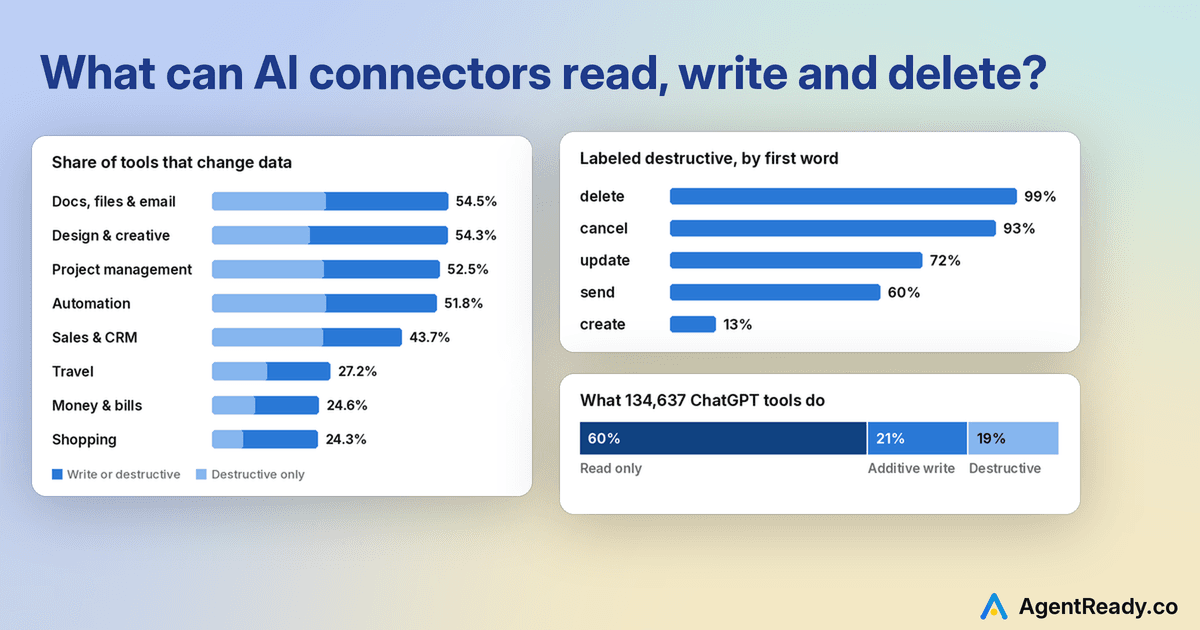
Can an AI connector delete things in my account?
Often, yes. In ChatGPT, 41% of plugins have at least one tool labeled destructive, and another 40% only read. But deletes are the small part. Most of the risk sits in tools that overwrite, cancel or send.
Some context: each connector offers tools, single actions such as "search channels" or "delete a task" that the assistant can call for you. The MCP spec lets each tool say if it only reads (readOnlyHint) and if it can destroy something (destructiveHint). Both OpenAI and Anthropic now require these labels, and they decide when ChatGPT and Claude stop to ask you first.
ChatGPT publishes the labels for every tool in its directory, so we read all 134,637 of them. Here is what we found.
How many connector tools read, write or delete?
Three in five ChatGPT tools only read (60%). About one in five makes additive changes, such as creating a draft or adding a comment (21%). And about one in five is labeled destructive (19%).
Popular connectors act more, but they do not take more risk. In ChatGPT's top 100, only 12.5% of plugins are read-only, against 41% of the rest. Yet about 20% of tools are destructive in both groups.
Is destructive the same as delete?
No, and this is the most useful thing a brand can learn from the data. Of the 26,220 tools labeled destructive in ChatGPT, only 6,628 have a delete-type word (delete, remove, cancel, archive, revoke) in the name. The most common first word among destructive tools is update (3,912 tools), ahead of delete (3,306). An update that replaces a value can lose data as surely as a delete, and Slack's own labels show it:
How developers label each verb shows where the judgment calls are. In ChatGPT, 99% of tools whose name starts with delete are labeled destructive, and so are 93% of cancel tools. For update it is 72%, for send 60%, and for create 13%.
Sending is the gray zone. OpenAI's guidelines call irreversible sends destructive, yet 6 of the 23 tools named send_email are labeled additive. One of them is OpenAI's own Outlook Email plugin, which will "Send a new Outlook email immediately." You cannot unsend an email, but it does not erase anything either, so both readings are defensible.
Which kinds of connectors can change the most?
Work tools change the most. In documents, design, project management and automation, more than half of all tools write or destroy. Money, shopping and travel plugins mostly read.
That fits the job. A task board is only useful to an assistant if it can move, close and edit tasks, so 74% of project management plugins have a destructive tool. Two in three travel plugins (66%) only read, because most of them search fares and hand the booking back to a website.
Few tools move money at all. We found 124 ChatGPT tools with names like refund, payout or create_payment, and more than half of them only read.
How do the best connectors describe their delete tools?
They warn the model in the tool's own description. Here is how some well-known connectors describe theirs in ChatGPT.
| Connector | Tool | From its description |
|---|---|---|
| Asana | delete_task | “Use with extreme caution as recovery is challenging.” |
| Slack | slack_delete_message | “This is destructive and cannot be undone.” |
| Neon | delete_branch | “NEVER run autonomously; always ask the user first.” |
| Dropbox | delete | “they remain recoverable in Deleted files” |
| Atlassian | executeDestructive | “deletes or irreversibly changes data” |
These descriptions tell the model when to hold back, and they tell the user what happens if the call goes through. Dropbox's note that files stay recoverable is just as useful as Slack's warning that a delete is final.
Our favorite is a small reading app, Readplace. Its delete_article tool is labeled read-only and says plainly: "Calling this does NOT delete anything." It returns instructions, and the user deletes the article in the app.
When do ChatGPT and Claude ask me before a connector acts?
That depends on your settings, and the labels feed into them. ChatGPT offers four permission levels: Always ask, Allow read actions, Allow low-risk actions and Allow all actions. Claude groups tools into read-only and write/delete, and you can set each group or tool to Always allow, Needs approval or Blocked.
So a user who picks "allow reads" gets asked about everything else. A tool labeled read-only that is not read-only skips the question. The MCP spec says these labels are hints, not guarantees, and that a person should be able to deny a tool call.
So, what should you do?
Separate reads from writes. A tool that both lists and deletes has to be labeled destructive, and then every lookup asks permission. Split tools let an admin allow the read-only set and keep writes behind approval.
Put destructive actions behind one door. Atlassian, #5 in ChatGPT, has separate tools for read-only, write and destructive operations, so the one destructive tool is easy to find, label and block.
Label by effect, not by verb. An update that overwrites is destructive. A send that cannot be recalled probably is too, by OpenAI's own wording.
Say what happens in the description. "Recoverable in Deleted files" and "cannot be undone" are both good answers. Silence is the bad one.
Methodology
We read the ChatGPT plugin directory every day and store each tool's name, description and labels. All numbers here are from October 20, 2026, and cover the 134,637 tools in 6,327 ChatGPT plugins. Claude's public directory does not show the labels, so the numbers are ChatGPT only. Categories are our own labels, and the chart includes only categories with at least 1,500 tools. More on our method page.
 What is "skills over MCP" and who implements it today?Oct 25, 2026 · 3 min read
 Can my ChatGPT plugin message people first?Oct 20, 2026 · 4 min read
 What are ChatGPT plugin extensions, and do I need one?Oct 20, 2026 · 4 min read