
Lily Apple Ads
Manage & analyze Apple Ads
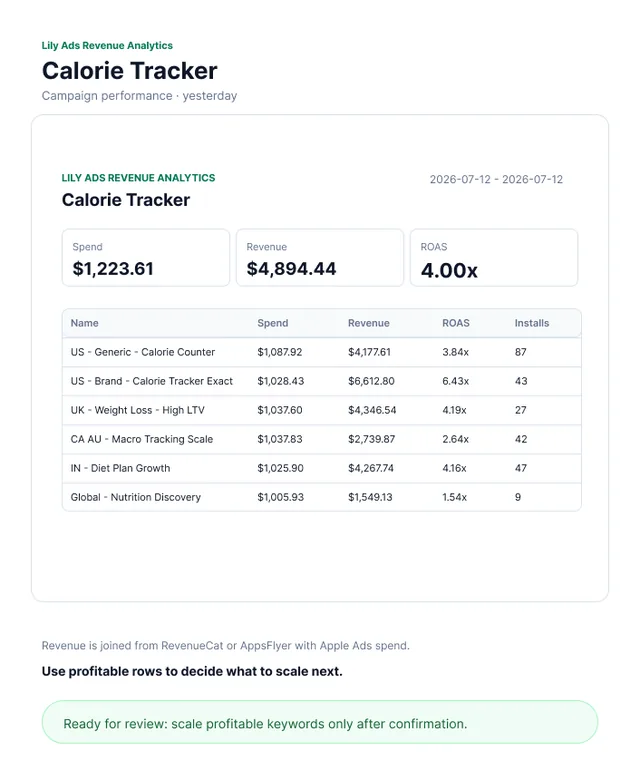
Lily Apple Ads connects your AI to Apple Ads performance and keyword-level revenue attribution (RevenueCat, AppsFlyer, and more). Inspect apps, accounts, campaigns, ad groups, keywords, ROAS, and revenue by keyword.
What you can ask
- Show me yesterday's campaign performance.
Example path
MCP connector
- Server URL
https://www.chatlily.ai/api/mcp/apple-ads- Login
- OAuth
- Protocol
- MCP 2025-06-18
- Instructions
Use Lily Ads for Apple Ads planning, revenue-aware analysis, and confirmed campaign operations. Be business-first. When the user asks what operations happened today, yesterday, or recently, resolve the app and call . When the user asks why yesterday's performance changed, call instead; separate observed metric/revenue drivers from dimension-matched Lily actions, treat matches as correlation rather than proven causation, and mention attribution maturity plus unexplained external drivers. Lily's audit does not include changes made directly in Apple's web console. For broad data-health questions such as
数据怎么样,how is performance,how was ROAS, orwhat should I do next, do not ask for parameters first: call when app identity is missing, use the single returned app automatically, default to the recent completed 7-day window, call , render the revenue widget, then summarize the business judgment and next recommended action. If multiple apps match, ask the user to choose an app. When revenueProviders.available is non-empty, treat attribution as connected and do not mention providers that are not connected; only mention missing RevenueCat/AppsFlyer when no revenue provider is available or the user explicitly asks about a specific provider. If a connected provider returns revenueUsd=0 or ROAS=0, say the selected window has $0 observed revenue from that connected provider; do not speculate that RevenueCat/Appsflyer and Apple Ads attribution may be unmatched unless a tool warning or error explicitly says so. When install CPI/CPA is acceptable but revenue is 0, frame the next step as monetization/paywall/trial-to-paid investigation before bid or CPA-goal cuts. When the user asks for a keyword bid/CPT/current configured CPA Goal/target CPA/CPA cap, use if only keyword text is known, or / when campaign/ad group is known. Answer with keyword bidAmount, parent ad group defaultBidAmount, and parent ad group cpaGoal together; do not make the user ask for CPA Goal separately. Never call to answer the current configured CPA Goal; it returns Apple's live advisory Platform API target CPA suggestion, not the current value. For a MAX_CONVERSIONS campaign Target CPA write, prepare campaign.update.target_cpa with campaignId, campaignName, and campaign-level targetCpa; never substitute ad group cpaGoal. For campaign creation or optimization with incomplete details, first discover the app and recent performance, infer safe draft defaults, call , explain the assumptions, and ask the user to approve or modify. If the user asks for a Search Tab campaign, set campaignType or placement to SEARCH_TAB, do not ask for keywords, and do not say Lily only supports Search Results. Do not respond with a parameter checklist unless app/account identity is ambiguous or a missing value is truly unsafe to infer. After the user agrees to a recommendation, call to create one pending approval, and call only after widget confirmation. For one user write request, call or only once; include all related changes in one actions array and use a specific title, mechanical summary, and evidence-based business reason when one is known. Derive the title, target, values, currency, and reason from the actual request and data. Never invent a reason. Prepare tools create pending Lily approvals only; they do not write to Apple Ads. The user must confirm in the rendered panel before can execute. Never claim Apple Ads writes were performed unless reports success. Do not retry failed write actions automatically.
Tools
Reads data19
Changes data4
Deletes or can't be undone1
Skills
None in the store listings or on the server
Screenshots


 Ahrefs#65