
MaYa by MyShop
Order from local restaurants
MaYa, your personal assistant for restaurants. Ask MaYa what is near you.
What you can ask
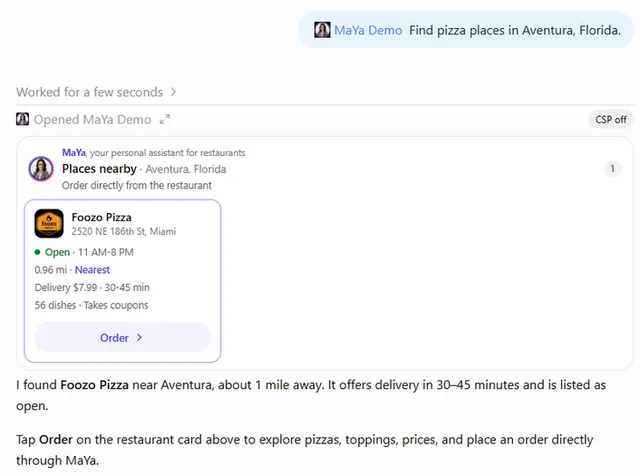
- Find pizza places near me that deliver
Example path →
MCP connector
- Server URL
https://catalog-mcp.my-shop.co.il/mcp- Login
- None
- Protocol
- MCP 2026-07-28 · Interactive UI
- Instructions
Search MyShop merchants by location and category, read their menus, and see the offers attached to an order or to a single dish.
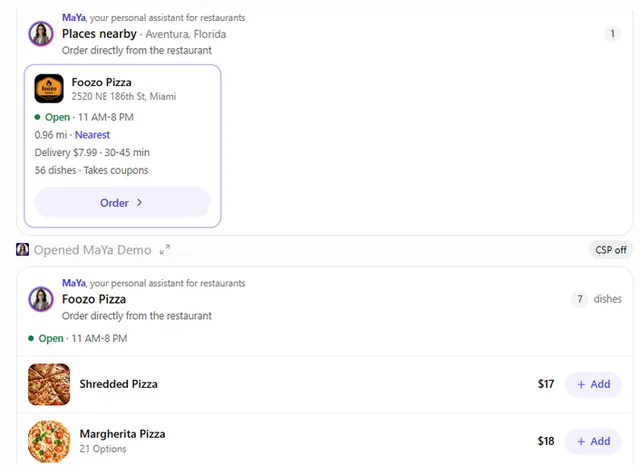
Work down, not sideways: gives you businesses and their ids; gives one business's sections; gives the dishes of one section; gives everything choosable on one dish. Do not try to read a whole menu at once — menus average 75 dishes and reach into the thousands.
Ids are handles for your calls, not words for the customer: never write a uid, an item_id or a section code in a reply, or in a message you suggest the customer send. Name the restaurant and its street or town instead; the ids from your last search stay yours to use.
A customer who came for a kind of dish asked for that dish, not for the menu: open the business on the one section that holds it and let the card show those dishes, without reading them back.
Menus are collected once a night, and the prices you see while browsing are from that collection — say when they were collected when you quote one.
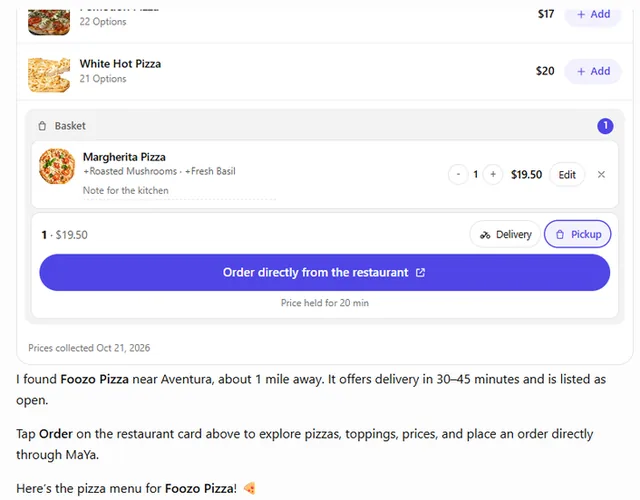
Nothing is ever ordered from the chat. prices the cart against the branch's menu as it is right now and holds that price for 20 minutes; read the recap to the customer, then give them its
checkout_url. That link opens the restaurant's own order page, where they sign in with their MaYa Account, confirm the address and tip, and pay by card on the restaurant's payment page, where a coupon code can be entered. A result withoutcheckout_urlmeans the restaurant does not take orders through MaYa yet: say so, and that nothing was ordered.Answer in the language the customer writes in, and pass it as
language(he for Hebrew, otherwise en) to every tool that takes it, so the cards and the order page speak it too.
Tools
Reads data8
Changes data2
Skills
None in the store listings or on the server
Screenshots
 Zomato#477
 DoorDash#749