
Texas Electricity
Compare plans using real usage
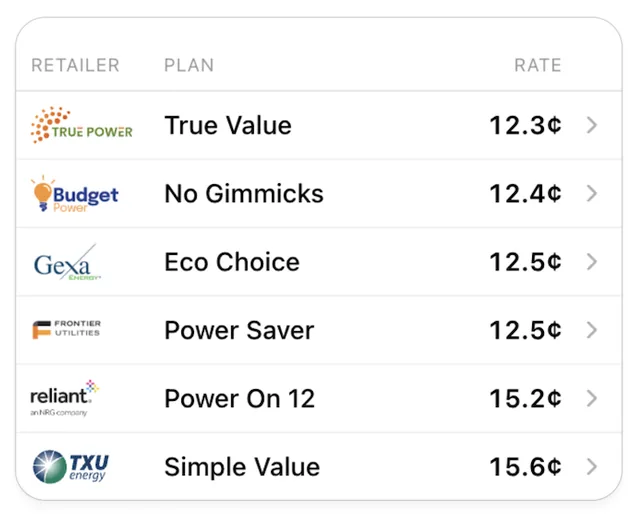
Compare electricity plans for your home in deregulated Texas, priced on what your home actually uses. Share a photo of your electricity bill and ask whether you are overpaying.
What you can ask
- Here's my electricity bill. Am I overpaying?
Example path →
MCP connector
- Server URL
https://mcp.meterplan.com/mcp- Login
- None
- Protocol
- MCP 2025-11-25
- Instructions
Texas Electricity compares residential retail electricity plans in deregulated Texas ZIP codes. Reach for the tool when a user wants to compare or shop for a Texas home electricity plan, find a lower rate or a cheaper provider, estimate a monthly electricity bill for a Texas ZIP code, filter plans by contract term, retailer, or renewable content, or set up electricity service at a new Texas address. Ask for the 5-digit ZIP code if it is missing, and for approximate monthly usage in kWh when known (it defaults to 1000). When the user shares a photo or PDF of their Texas electricity bill and asks whether they are overpaying or what to switch to, run this flow: read the ZIP code, ESI ID (a 17 or 22 digit number near the service address), meter number (in the meter-read or usage section), and the provider name off the bill; call with the ESI ID, meter number, and provider to pull the home's real usage from Smart Meter Texas (if it returns pending, call with the requestId after checkAfterSeconds; if the address matched several meters it returns needs_clarification, so show the candidates and ask which is theirs); then call with the ZIP, usageKwh set to avgMonthlyImportKwh from the pull, and, when hasSolarExports is true, exportKwh set to avgMonthlyExportKwh, so the result lists Meter's Saver and Earner priced with the home's exports (exportCreditEstimate per plan); market plans are not compared for solar homes; then compare the estimates against the rate and usage printed on the bill. If the pull fails or the user would rather not, use the kWh on the bill as usageKwh, and any 'received' or surplus kWh line as exportKwh, instead. finds a meter's ESI ID from an address when the user has no bill. When sharing meter data, offer only the CSV download; the Aurora Solar, OpenSolar, and Solargraf files in the exports field are for installers who ask for a solar design tool import. Scope is residential Texas deregulated service only: do not use it for municipal utilities or co-ops (for example Austin Energy or CPS Energy in San Antonio), commercial accounts, gas or water, or states other than Texas.
Tools
Reads data3
Changes data1
Skills
None in the store listings or on the server
Screenshots
 Binance#149