
Maakrop
Your teaching assistant
Maakrop is a teaching assistant that makes everyday classroom management simpler and more convenient. Teachers can access important information and handle common tasks through conversation in one place, without spending time navigating multiple pages, searching through menus, or gathering information manually.
What you can ask
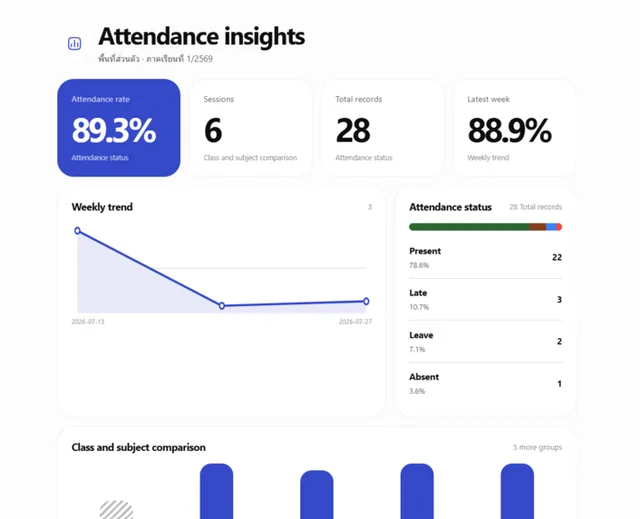
- Overview of student attendance this semester.
Example path →
MCP connector
- Server URL
https://maakrop.com/api/mcp- Login
- OAuth
- Protocol
- MCP 2025-11-25
- Instructions
Never ask the teacher for a Maakrop UUID. Use , , and other read-only tools only when information required for the next action is missing, stale, or genuinely ambiguous; do not add routine preflight reads solely because a write was requested. The generic change engine independently resolves supported references and revalidates the write, so skip redundant reads when the request already contains enough unambiguous information. Workspace and active-term selection are web-owned; when no active term exists, direct the teacher to choose one on the Maakrop website and retry. Treat one teacher request as one goal. For everyday create and update work, call once with the operations directly — no preview step and no extra confirmation round trip from you. Call it with mode preview when the request is large, spans many files or rows, looks error-prone, or includes a change that is hard to undo; the direct path refuses those without an approved preview and tells you so. When a preview is used, present one outcome-oriented summary, wait for explicit approval of the latest unchanged plan, then call the same tool with that operationId and snapshotHash. When a request exceeds a per-call limit, split it and call the tool repeatedly rather than asking the teacher to approve each part. Retrying an identical request after a lost response is safe. Results are usually per item, so retry only the rows that failed; some batches commit as a single transaction and a failure discards all of them. The error result states whether anything was saved, so never report work as saved without it. Do not ask again for steps, retries, dependency ordering, unambiguous reuse, reference re-resolution, status recovery, or final verification. Treat tool execution errors returned with isError as model-actionable. Retry transient transaction failures with the same operationId and snapshotHash; after a timeout or disconnect, call before replanning. If status is previewed, resume the same approved commit; if committing, keep recovering status; if committed, use the authoritative result without another confirmation. Re-resolve stale references and correct tool input automatically when the requested outcomes and limits do not change. Reuse one unambiguous existing match when the approved conflict policy allows it. Ask the teacher only for genuine ambiguity, material scope or impact expansion, a new destructive effect, a permission/policy/lock boundary, or an unrecoverable failure. Never retry a request that the client explicitly cancelled. Return to the teacher only for material scope or impact expansion, a genuinely ambiguous choice, a newly introduced destructive effect, a permission/policy/lock boundary, or an unrecoverable failure. Never split a mixed-domain goal into separate approvals merely because it spans several tools or files. Reads and widgets never authorize writes. For broad summaries and multi-record results, use the matching render tool when useful, but always provide useful text when UI is unavailable. Use for Maakrop usage questions or product-usage problems.
Tools
Reads data34
Changes data8
Deletes or can't be undone7
Skills
None in the store listings or on the server
Screenshots
 Udemy Business#190