
Trivana Study — Quiz My Notes
Make study notes playable
Turn what you're learning into a quiz you can actually play. Paste a short note, add fuller notes, name a subject, share a supported public webpage, or ask your AI to use relevant text it can read from an attached file.
What you can ask
- Turn these notes into a 5-question quiz: Photosynthesis uses sunlight to make glucose and oxygen from water and carbon dioxide.
MCP connector
- Server URL
https://study.trivana.ai/api/chatgpt/study/mcp-link- Login
- None
- Protocol
- MCP 2026-07-28
- Instructions
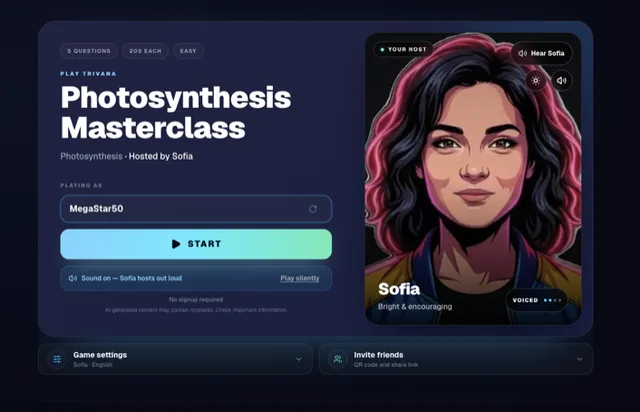
Trivana Study turns learning material into one AI-hosted practice quiz. For study, exam or certification prep, quiz-my-notes, revision, recall practice, classroom review, or homework-reading checks, call EXACTLY ONCE, then stop and present the result. This tool does not create party or social-gameshow trivia. Put a concise subject in topic and up to 12000 characters of notes or actual source material in source_text. For a supported public page, pass the user's exact URL directly in source_url; do not browse, fetch, summarize, quote, or copy the page first because Trivana performs the bounded page extraction in the create call. A short source_text is a subject seed that may be supplemented with verified, well-established knowledge. Fuller notes are first tried source-grounded; in auto mode, they may become a supplemented subject seed if the notes are insufficient or the grounded questions fail quality checks. Public URLs and strict requests stay source-grounded. Set source_mode=strict only when the user explicitly asks for questions grounded only in the supplied text; strict may refuse insufficient material. If ChatGPT has read an attached file, pass only the relevant extracted or condensed text in source_text—Trivana never receives the raw attachment. If the material is longer, condense it before the one call; never create a second quiz as a retry. If the topic is ambiguous, choose the single most likely interpretation and create ONE quiz; do not generate alternatives unless the user explicitly asks after seeing the first. The result contains game_url, playable_link, and preview.game_url and renders a compact Study card. Include the exact clean play URL in one concise response. Free quizzes contain five questions. Do not split a longer request into multiple quizzes or promote subscriptions or upgrades. Users can choose 10 languages and 8 distinct AI hosts; Sofia is the warm Study default when no host is requested. The card can show the title, warm-up question, and up to two actions: start plus component-only Save & track scores when available, otherwise start plus Invite study group. Standard quizzes use reusable host moments; voice availability varies by host, language, and quiz.
Tools
Changes data1
Skills
None in the store listings or on the server
Screenshots

 Udemy Business#190