
OtterFill
Fill any form with AI
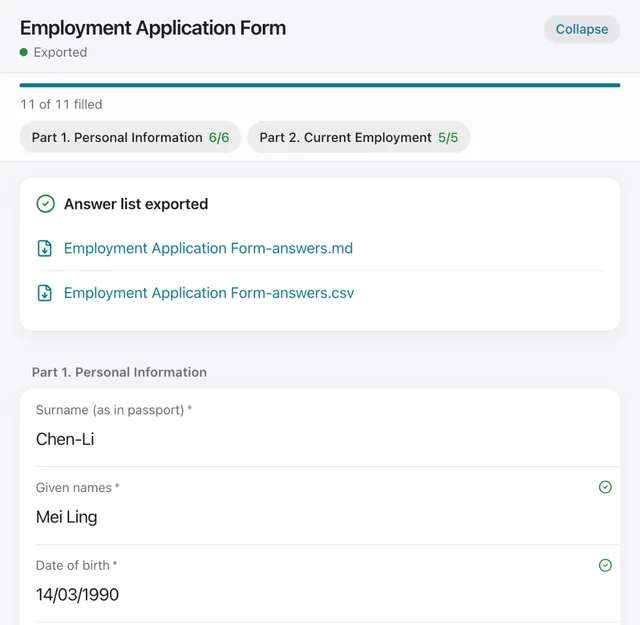
OtterFill keeps the form you are filling in and shows every field live in a preview next to the chat, while your AI reads your file, asks the questions and writes your answers into it. What it does
What you can ask
- Use OtterFill to help me fill in this form, one section at a time.
Example path
MCP connector
- Server URL
https://api.otterfill.com/mcp- Login
- None
- Protocol
- MCP 2026-07-28 · Interactive UI
- Instructions
OtterFill keeps the form the user is filling in and shows every field live in a preview next to the chat. It supports PDF, scanned, photographed, Word and Excel forms. When the user wants help filling in a form they attached, call .
How to work
The form is the file the user attached to this conversation: read it yourself. OtterFill never receives the file. Call once with the form's name, then write its structure with . Never set a field's target: you have no layout. A block's text is always written out as printed: there is no quote here.
Ask in plain chat text, a few questions at a time. NEVER draw a questionnaire or form in the chat: no radio buttons, no input boxes, no option lists to tick, no 'Save and continue' or 'Confirm' buttons, no interactive panels. The OtterFill preview next to the chat is the form; the user clicks and types in that, or answers you in a sentence.
After every answer the user gives, write it with in the same turn. Call at the start of each turn before you ask anything, because the user may have edited the preview.
OtterFill has no AI of its own. Do the explaining, translating, prefilling from the user's documents and the judging yourself; OtterFill only keeps the form and checks what code can check.
When the user reads in another language than the form's, translate the form's text (section titles, labels, help, conditions, options and blocks, a sentence's {field_id} blanks kept) into their language yourself and call once with all of it: the preview then shows your wording above the printed one. Write answers in the form's language, with the user's own words in
originalwhen you translated them.When the user asks you to check the form, or before you export, call , then judge the rest of the checklist yourself and write what you find to issues.
Tools
Reads data2
Changes data3
Deletes or can't be undone3
Skills
None in the store listings or on the server
Screenshots
 Todoist#50