Can you make your website an MCP server?
· 6 min read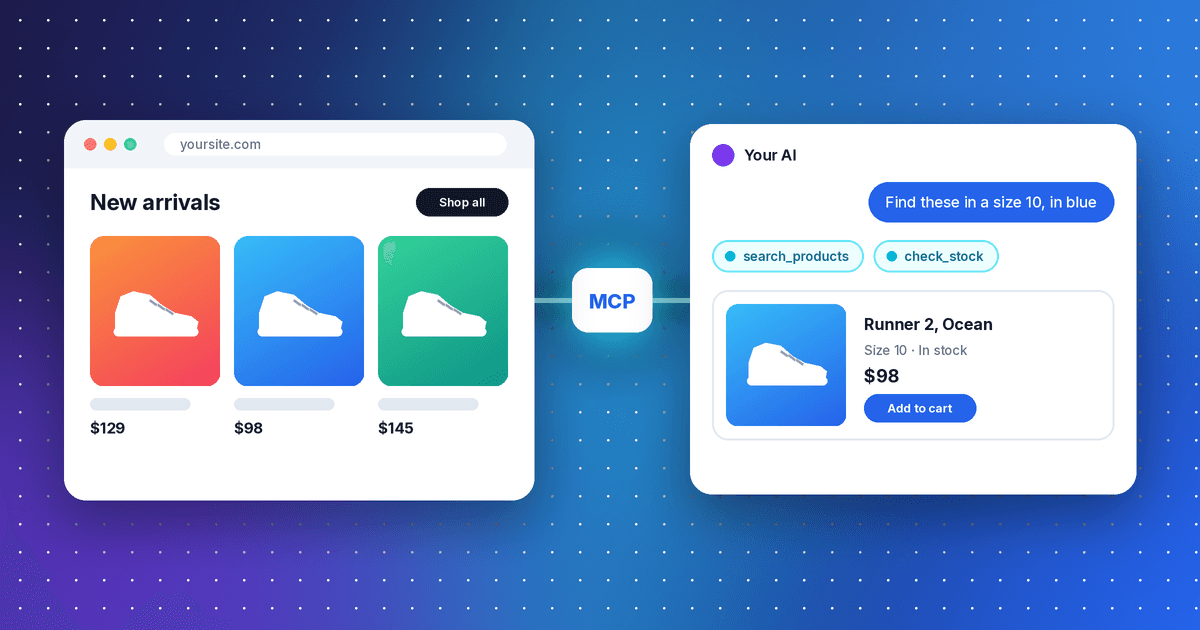
TL;DR: Yes, you can make your website into an MCP server.
Turning your website into an MCP server (also called a connector or a plugin) lets you submit it to the AI app stores, like ChatGPT, Claude, Gemini and Muse. Then your users can use your product inside their AI tools.
There are already more than 20,000 MCP servers in those stores, from Gmail and Figma to small tools you've never heard of.
In this post, we'll cover how to make your website into an MCP server. We'll also help you decide whether it's worth it, based on your site and your goals.
Why make your website an MCP server
An MCP server turns what people do on your site into tools an AI can use. Instead of opening your site, a customer asks Claude to "pull last month's invoices" or ChatGPT to "find a size 10 in blue," and the AI calls your tool to do it. That gets you three things:
- Customer value: Your existing customers get more out of your product, in the app they already work in.
- Retention: A product that's wired into someone's daily AI is stickier.
- New users: Some new customers find you, because AI apps now suggest connectors mid-chat. The effect is real but small so far (more on how people find connectors).
Business tools have seen the biggest benefit from MCP servers so far. 74 of the top 100 connectors in Claude are built for work:
Should you build one?
Not every website needs one. Here's how we'd decide:
- Your site is mostly information, like a blog or a menu. AI apps can already read your public pages.
- You're a small or local business. Keep your business listings and profiles up to date instead.
- You sell through a platform that's already in AI apps, like Shopify. Check what your platform does first.
- You earn money from display ads. There are no ads inside chat answers yet, so you risk sending traffic away from your monetized site.
- You're a business tool that knowledge workers use regularly.
- Your users are tech savvy, or many of them are software engineers.
- You're a consumer brand with a mobile app that people use regularly.
No API yet? Build that first. Your MCP server will call it for everything it does.
Decision 1: login or no login
The first decision is whether people sign in. A tool that only reads public data (your catalog, your prices, your docs) can skip it. Shopping is the best example: 531 of the 712 shopping connectors work with no sign-in.
But almost every connector at the top asks people to sign in:
Login adds a lot of personalization value. Once Claude knows who you are, it can read your orders, your files and your settings, not only the public catalog.
The catch is that login for an MCP server isn't your website's login. The AI app has to sign in on the user's behalf through OAuth 2.1. Think of it as supporting "Log in with [your app]," the way many sites support "Log in with Google."
Several tools do this out of the box, like Stytch Connected Apps, WorkOS AuthKit and Auth0 for MCP, or you can build it yourself. The key words to look for (or ask your AI about) are Client ID Metadata Documents, or CIMD, which is the recommended way to build authentication for MCP servers today. Older guides use dynamic client registration (DCR), but a new server should support CIMD.
Decision 2: text or UI
Your tools can answer in plain text, or they can show a widget in the chat. 47 of ChatGPT's top 100 plugins show UI, so it's common at the top but not required. Here are three from the stores:
Our advice: start with text. Add UI where people need to look before they act, like picking a product or checking a date. In the docs, look for the MCP Apps extension. (More in our post on UI in chat.)
How to build it with your AI coding tool
You don't need to read the whole spec yourself. The MCP project recommends a set of skills that teach your coding agent how to build an MCP server. They ask you a few questions first (what it connects to, who uses it, sign-in, UI), then build to fit. In Claude Code, install them with:
/plugin marketplace add anthropics/claude-plugins-official
/plugin install mcp-server-dev
Using Cursor, Codex or another agent? Copy the skill folders into your agent's skills folder. Then open your codebase and paste this prompt, with your choices filled in. It answers the skill's questions up front, so it gets straight to work:
Build a remote MCP server for this product, so our customers can use it inside ChatGPT and Claude. Use the build-mcp-server skill.

- What it connects to: this codebase and our existing API.
- Who uses it: our customers, who will add it from the ChatGPT and Claude directories.
- Tools: look through the codebase and propose the 5 to 10 things our users do most (search, look up, create, update). Wait for my OK on the list.
- Sign-in: [none, the tools only read public data | OAuth 2.1 with our existing accounts, using Client ID Metadata Documents].
- UI: [text only | an interactive widget for <the main result>].
- Follow the current spec at modelcontextprotocol.io and OpenAI's plugin docs at developers.openai.com/apps-sdk.
- Give every tool a clear title and description, and set readOnlyHint and destructiveHint on each one.
- Add tests, and tell me how to try it in Claude as a custom connector.
Run it in your codebase, not against your public site. The agent can see your real data model and API there, so the tools match what your product actually does.
Spend your own time on the tool descriptions. They're all the AI reads before it picks a tool, so write them for a model, not a developer (see what top-ranked connectors have in common).
Test it, then list it
To try it, paste your server's URL into Claude as a custom connector. Ask it to do the five things your customers do most, and fix every tool it picks wrong.
When it works, submit it to the Claude directory and to ChatGPT's plugin directory. Both review it first. Once it's listed, people can find it in the directory, and the AI can suggest it to them.
The lighter option: WebMCP
If a full MCP server is too much for now, there's a smaller step. WebMCP is a proposed web standard that lets your own pages tell AI agents in the browser which actions they offer, like "search products" or "book a table." There's no separate server and no store review, and it uses the visitor's normal session.
It's early, and only agents that support it can use it. But it's a cheap way to make your site friendlier to agents and to see what they try to do there.
We've built dozens of MCP servers and added WebMCP to sites of all types. Reach out to learn more.
Methodology
Counts are from our daily census of the AI app stores on November 14, 2026. "Sign-in" means the listing uses OAuth or an API key. Top 100 means each store's own ranking. Categories and "built for work" are our labels; see the methodology page.
 ChatGPT plugins are back. Here's what changed since 2023Nov 14, 2026 · 4 min read
 Claude connectors: what they are and the ones people useNov 14, 2026 · 4 min read
 How to build an MCP server people will actually useNov 14, 2026 · 5 min read


 NotionDocs, files & email
 HubSpotSales & CRM
 AsanaProject & product management
 CanvaDesign & creative