
Claude
- Open Add custom connector ↗
- Name it Chalkreel and paste the URL
- Click Add, then ask away
https://chatgpt.chalkreel.app/mcp
DO TU ANH·Live in 
Whiteboard explainer videos
Chalkreel turns an idea into a hand-drawn whiteboard explainer video, right in the chat.
Ask for a video on any topic — a lesson, a product pitch, a how-to, a story — and Chalkreel draws it scene by scene: titles and short board text written by a marker hand, bullet lists, charts, timelines and flowcharts, 229 doodle props and 24 characters who can speak lines in speech bubbles. A player appears in the conversation where you can play the video, jump between scenes and see every scene as a thumbnail.
What you can do:
Presenter: add a host character who stands in every scene and speaks the narration, with lips in sync.
AI voice-over: natural AI voices read the narration and the characters' lines (the voices are AI-generated).
Your pictures: put photos, diagrams or images you made in your AI into scenes — tap + on a scene in the player to add them from your device or your your AI files.
Formats and looks: 16:9, 9:16 for Shorts, Reels and TikTok, or square; whiteboard, chalkboard, blueprint, notebook, kraft paper and more; marker, pencil, chalk or brush hands; background music and captions.
47 templates for education, business, marketing, social media and science.
Changes in plain words: "make scene 2 longer", "switch to a chalkboard", "add calm music" — Chalkreel redraws the video.
MP4 export: export a 720p MP4 with a small "Made with Chalkreel" mark, encoded in your browser.
Keep editing: download the Chalkreel project and open it in Chalkreel for iOS or Windows.
Privacy: Chalkreel has no accounts, no ads and no tracking, and its server stores nothing. Rendering and MP4 export happen in your browser; voice-over text is sent to OpenAI's text-to-speech API to make the audio. Details at chalkreel.app/privacy.
Notes: MP4 export needs a browser with H.264 encoding (current Chrome or Edge, Safari 17+). Board text supports Latin, Greek, Cyrillic and Vietnamese scripts.
ChatGPT rankMake a whiteboard video explaining how vaccines train the immune system, with a presenter and voice-over
https://chatgpt.chalkreel.app/mcp

https://chatgpt.chalkreel.app/mcpchatgpt.chalkreel.appThe AI reads these server instructions before using this connector, every time.
Chalkreel makes hand-drawn whiteboard videos that play, export to MP4 and download in the chat.
first: prop, character and music names come from it.
, 3–8 scenes: title, narration of 15–35 words, text OR ≤ 4 bullets OR a chart, 1–3 props, 0–2 characters. Or → → .
To edit, call the same tool again with the whole changed spec.
A character who talks through the WHOLE video (host, teacher, presenter): set presenter (e.g. "Mr. Okafor"), never characters[].says.
Pictures the user uploaded or you generated go INTO the video: pass them as image1…image8 and put scenes[i].images: [{file: N}] (or {url} for a public https image).
None in the store listings or on the server

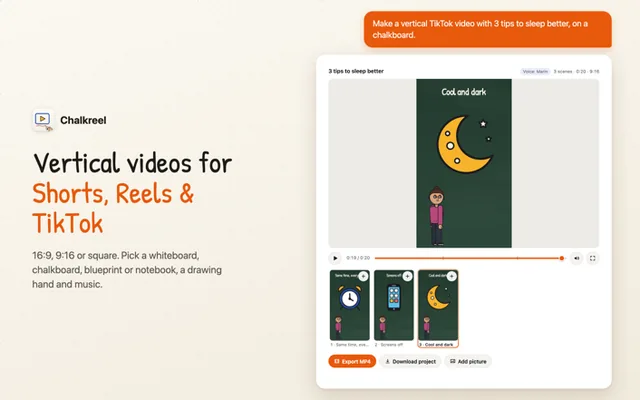

Whiteboard explainer videos. Chalkreel turns an idea into a hand-drawn whiteboard explainer video, right in the chat. Ask for a video on any topic — a lesson, a product pitch, a how-to, a story — and Chalkreel draws it scene by scene: titles and short board text written by a marker hand, bullet lists, charts, timelines and flowcharts, 229 doodle props and 24 characters who can speak lines in speech bubbles.
Open its listing in the app's connector directory and connect. No sign-in is needed. Step-by-step setup for each app is on this page.
The Chalkreel MCP server URL is https://chatgpt.chalkreel.app/mcp. Paste it as a custom connector in Claude, ChatGPT, Gemini or Grok, or add it to Claude Code, Cursor or any MCP client. Setup steps.
Yes. Chalkreel is published or run by DO TU ANH, so it is the official MCP server. See other official connectors.
It is listed in 1 store: ChatGPT. Apps where it is not listed can usually still add it as a custom connector.
It is ranked 13,822 of 15,293 in the ChatGPT directory. A rank is the store's own order, not a usage count. How we track ranks.
It has 6 tools: 6 read data. See every tool and its inputs.
No. All of its tools only read data.
None that we found. None in the store listings or on the server.
Here are examples from its store listing. Type one into your AI after you connect.
Yes. Some of its tools show an interactive widget in the chat, not only text. See more connectors with interactive UI.
This page updates every day. To ask about Chalkreel from Claude, ChatGPT or a coding agent, connect the Agent Ready MCP server: it tracks ranks, tools and new listings across the AI plugin stores.