
Claude
- Open Add custom connector ↗
- Name it Foam and paste the URL
- Click Add, then ask away
https://foam.ilyyya.com/api/chatgpt/mcp
Ilya Torgovnikov·Live in 
Know when to surf.
Foam helps you find a good time to surf. Check today or tomorrow, with a simple read of the conditions and clear surf, wind and tide charts.
Explore major surf breaks around the world. No Foam account needed.
ChatGPT rankHow’s the surf tomorrow in Senggigi?
Follows the skill
https://foam.ilyyya.com/api/chatgpt/mcp

https://foam.ilyyya.com/api/chatgpt/mcpfoam.ilyyya.comThe AI reads these server instructions before using this connector, every time.
Foam provides modelled surf forecasts for supported catalogue breaks, today and tomorrow only. Use for forecast questions, passing the requested day. A named area such as Senggigi is enough: use location, without asking for a specific break or expanding it into a shortlist. Keep the final reply to one short paragraph using the returned briefing, with no lists, data tables, links or unsolicited break comparisons. Find identifiers with . For comparisons, use the returned comparison briefing in one short paragraph, normally two to four sentences. No tables or lists unless explicitly requested. Keep ties explicit; explain further readings only when asked. Give useful insight first; mention a limitation once only when it changes the decision. Never invent numbers, local reports, cameras or future dates. Keep times in each break's timezone and preserve skill notices and supplied local minimum-tide guidance. Preserve a check verdict for marginal swell rather than calling it flat or recommending a surf. When no break reaches fair or recommendedSlugs is empty, do not recommend paddling out or describe the least bad hours as a recommended session. A check means inspect from shore. Equal ratings are ties, not evidence one break is better. Do not request GPS, personal addresses or secrets. Public tools are read-only and require no sign-in.
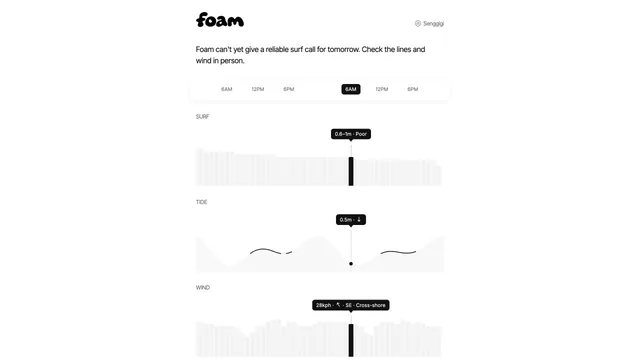
Know when to surf. Foam helps you find a good time to surf. Check today or tomorrow, with a simple read of the conditions and clear surf, wind and tide charts.
Open its listing in the app's connector directory and connect. No sign-in is needed. Step-by-step setup for each app is on this page.
The Foam MCP server URL is https://foam.ilyyya.com/api/chatgpt/mcp. Paste it as a custom connector in Claude, ChatGPT, Gemini or Grok, or add it to Claude Code, Cursor or any MCP client. Setup steps.
Yes. Foam is published or run by Ilya Torgovnikov, so it is the official MCP server. See other official connectors.
It is listed in 1 store: ChatGPT. Apps where it is not listed can usually still add it as a custom connector.
It is ranked 14,607 of 17,154 in the ChatGPT directory. A rank is the store's own order, not a usage count. How we track ranks.
It has 5 tools: 5 read data. See every tool and its inputs.
No. All of its tools only read data.
It comes with 1 skill. A skill tells the AI how to do one job well with these tools. Read each SKILL.md.
Here are examples from its store listing. Type one into your AI after you connect.
Yes. Some of its tools show an interactive widget in the chat, not only text. See more connectors with interactive UI.
This page updates every day. To ask about Foam from Claude, ChatGPT or a coding agent, connect the Agent Ready MCP server: it tracks ranks, tools and new listings across the AI plugin stores.