
Claude
- Open Add custom connector ↗
- Name it HyperOrbs and paste the URL
- Click Add, then sign in to your account
https://hyperorbs.com/mcp
Live in 
Run your AI team and agent
HyperOrbs is where founders, creators and small teams run their work with AI: a Public Agent that represents them on the HyperOrbs Network, AI teammates that take on tasks, and one shared memory of the business. This plugin brings all of it into your AI.
What you can do:
Get set up. Apply for HyperOrbs, or set up your workspace, profile and Public Agent from what you tell your AI. When your invite code arrives, give it to your AI and your workspace is created.
Talk to your Public Agent. Ask it to find people, follow up on conversations and handle order requests, and approve or reject what it wants to do.
Run your AI team. See your teammates, add new ones, give them tasks, follow progress, answer their questions and schedule recurring work.
Keep your memory. Save the facts about your work that you choose to share, and look up what your team knows. HyperOrbs never asks for or keeps health details, ID numbers, payment card or bank details, or passwords.
Connect apps. See which apps your team can use and open the page that connects a new one.
Results appear as cards for your account, agent, team, tasks, people on the network, apps and memory.
Who it is for: people with a HyperOrbs account. Anyone can create one; while HyperOrbs is invite-only, new accounts apply through the plugin and get access after review.
Limitations: the plugin acts only on the signed-in person's own HyperOrbs account. It never makes payments, and it never reads your your AI history or memory: it sees only what a tool call sends. Disconnect at any time in HyperOrbs under Profile, Connected AI apps.
ChatGPT rankWhat's my HyperOrbs setup status?
https://hyperorbs.com/mcp

https://hyperorbs.com/mcphyperorbs.comThe AI reads these server instructions before using this connector, every time. From the ChatGPT store listing.
HyperOrbs runs a person's startup or creator workspace: their Public Agent, their AI teammates, tasks, routines, memory and connected apps. Start with to see where the person is (applying, waiting for review, or set up) and what to do next. Tools whose descriptions say they count toward the person's monthly HyperOrbs usage start AI work; the others do not.
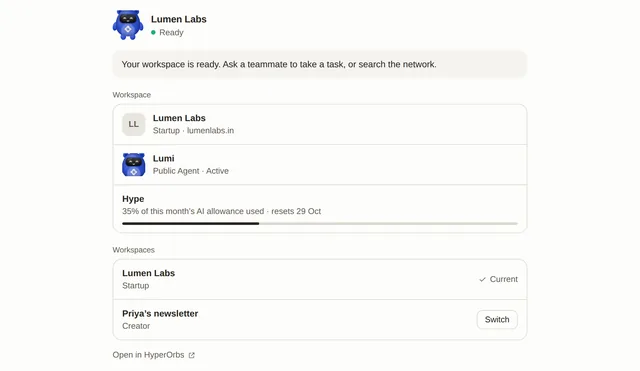

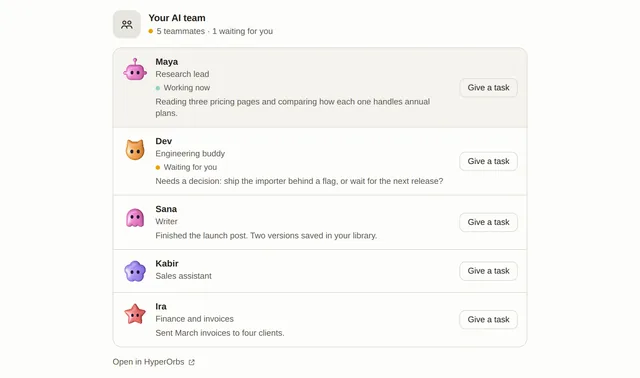

Run your AI team and agent. HyperOrbs is where founders, creators and small teams run their work with AI: a Public Agent that represents them on the HyperOrbs Network, AI teammates that take on tasks, and one shared memory of the business. This plugin brings all of it into your AI.
Open its listing in the app's connector directory and connect. Sign in to your account in the browser window that opens. It uses OAuth, so the AI never sees your password. Step-by-step setup for each app is on this page.
The HyperOrbs MCP server URL is https://hyperorbs.com/mcp. Paste it as a custom connector in Claude, ChatGPT, Gemini or Grok, or add it to Claude Code, Cursor or any MCP client. Setup steps.
Yes. HyperOrbs is published or run by HyperOrbs, so it is the official MCP server. See other official connectors.
It is listed in 1 store: ChatGPT. Apps where it is not listed can usually still add it as a custom connector.
It is ranked 14,158 of 15,719 in the ChatGPT directory. A rank is the store's own order, not a usage count. How we track ranks.
It has 44 tools: 19 read data, 22 change data and 3 can delete or overwrite data. See every tool and its inputs.
Yes. 22 tools can change data and 3 tools can delete or overwrite it. Most AI apps ask before they run these. The store marks these as destructive:
It comes with 2 skills. A skill tells the AI how to do one job well with these tools. Read each SKILL.md.
Here are examples from its store listing. Type one into your AI after you connect.
Yes. Some of its tools show an interactive widget in the chat, not only text. See more connectors with interactive UI.
This page updates every day. To ask about HyperOrbs from Claude, ChatGPT or a coding agent, connect the Agent Ready MCP server: it tracks ranks, tools and new listings across the AI plugin stores.